Blu-ray Disc for Mac is here. And at 16X it's faster than ever.
Blu-ray Disc (BD) technology, with its ability to record to 25GB single-layer, 50GB dual-layer discs, 100GB and 128GB quad-layer discs is the next generation in optical disc storage and MCE Technologies has brought it to the Mac. The MCE Technologies 16X Blu-ray Internal Recordable Drives for Apple Mac Pro and Power Mac and External USB Recordable Drives for Mac are the fastest and most versatile Blu-ray drive we have ever shipped. 700% faster than our first Blu-ray drive for the Mac, it comes to you completely pre-configured for easy user installation. In addition to writing to 25GB single-layer and 50GB dual-layer at up to 16X speed, the MCE Technologies 16X Blu-ray Recordable Drive is compatible with all DVD and CD recordable media including DVD±R/RW + Dual/Double Layer, DVD-RAM, and CD-R and CD-RW. The drive has a 4MB buffer for writing Blu-ray Disc and DVD media and has built-in Buffer Underrun protection. The drive includes a 25GB Blu-ray BD-RE rewritable disc so you can start making your own Blu-ray movies immediately. Prices start at $99, or bundle it with Toast 12 Titanium recording and Blu-ray authoring software for only $179!

Blu-ray SuperDrive
Store up to 12,500 music tracks, 50,000 photos, or 4 hours of HD video on a single 50 GB Blu-ray Disc. The MCE 16X Blu-ray Disc Recordable Drive for the Mac Pro and Power Mac and External USB Recordable Drives incorporate a state-of-the-art blue-violet laser and ushers in the next generation of optical disc storage. The drive also writes to all DVD±R/RW + DL (Double/Dual Layer) media, DVD-RAM, and CD-R/RW media and is compatible with all Apple's iApps.
Blue-Violet. 405nm.
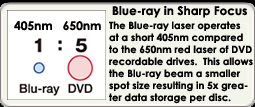
The figure to the right shows the difference in spot size between a Blu-ray laser and standard DVD recording laser. The smaller, tighter Blu-ray spot size means more spots (data) can be recorded to the disc resulting in data capacities of 25GB and 50GB per Blu-ray disc.
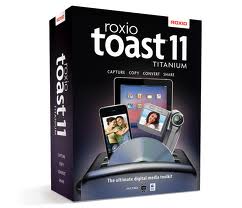
Optional Toast 12 Titanium with High-Def/Blu-ray Disc Plug-in
The MCE 16X Blu-ray Internal and External Recordable Drives for Apple Mac can be bundled with multi-award winning Toast 12 Titanium (including the Toast HD/BD Plug-in) for only $80 more... a savings of over 33% off the retail price!. The HD/BD Plug-in will allow you to create your own Blu-ray movies with custom menus playable on set-top Blu-ray players as well as Playstation 3 game consoles. Toast 12 Titanium manages all Blu-ray recording functions for the drive and incorporates a special feature called Toast Dynamic Writing. When used with a Blu-ray rewritable disc (BD-RE), Toast Dynamic Writing lets you use your Blu-ray Disc recorder like a giant hard disk drive – drag and drop directly onto the disc icon to add or remove files. Blu-ray burning is here today. Toast 12 Titanium also includes comprehensive backup software which allows for manual, as well as scheduled backups to your MCE Blu-ray Internal Recordable Drive. It will even automatically manage disc spanning should all your data not fit on one disc.
| Media |
Single-Layer Writing
|
Dual-Layer Writing
|
ROM Reading
|
 |
14X BD-R
2X BD-RE |
12X BD-R
2X BD-RE |
12X BD-ROM |
 |
16X DVD+R
8X DVD+RW
16X DVD-R
6X DVD-RW
5X DVD-RAM |
8X DVD+R DL
8X DVD-R DL |
16X DVD-ROM |
 |
48X CD-R
24X CD-RW |
|
48X CD-ROM |
Baseline specifications for recordable media are as follows: Blu-ray 1X = 4.5MB/sec, DVD 1X = 1.375MB/sec, and CD 1X = 150KB/sec. For instance, Blu-ray media recording speed of 14X (63MB/sec) is equivalent to writing to DVD media at a speed of 45.8X, which is equivalent to writing to CD media at a speed of 420X!
Author Professional Blu-ray Movies
As high definition (HD) has become the new standard for video, and Blu-ray Disc has won the high-definition format war for storing HD content, it's more important than ever to be able to author professional-quality Blu-ray discs. You can do so with the MCE 12X Blu-ray Recordable Drive and Apple's new Final Cut Studio and Final Cut Pro X. That's right, you can now easily burn a Blu-ray disc directly from Final Cut Pro 7 or later as well as from Compressor 3.5 or later. Quickly add a menu to your disc by choosing one of the beautiful Apple-designed HD templates or, to achieve a specific look, import and use third-party or custom templates. Use your own graphics for backgrounds and titles, as well. You can also author Blu-ray movies using Adobe Premiere Pro CS5. Adobe Encore CS5 software is the key. Included with Adobe Premiere Pro CS5, Adobe Encore CS5 software makes output to a wide range of industry-standard media formats, including Blu-ray Disc, easy and efficient. Use the same Encore interface and features to author and deliver commercial-quality titles on both standard-definition DVD and high-definition Blu-ray Disc. Or author a high-definition Blu-ray Disc project and, with one click, create a finished standard-definition DVD project. Encore CS5 enhances your workflow by outputting to Blu-ray discs, even if you're editing with an alternative editing software such as one of Avid's professional editing tools.
The optional Toast 11 Titanium with included HD/BD Plug-in also allows you to create Blu-ray movies and even has basic menu customization features. Blu-ray movies created using either software are playable on standard Blu-ray set top boxes as well as Sony Playstation 3 game consoles.
Watch Blu-ray Movies on your Mac!
Included with your MCE 14X Blu-ray Recordable drive is Mac Blu-ray Player software that allows you to watch commercial Blu-ray titles as well as your own authored Blu-ray movies directly within the Mac operating system. No more having to turn your Mac into a PC using Boot Camp to watch a Blu-ray movie. Now you can review your work on the Blu-ray movies you create as well as enjoy your favorite commercial Blu-ray movies in full high definition and stereo sound. The bundled Mac Blu-ray Player software includes a one-year license which enables full Blu-ray playback absolutely free for one full year from the date of first activating the Mac Blu-ray Player software. Anytime during, or after, the one year period a lifetime license can be purchased at a substantial discount from the retail price of $59.95. System requirements of Mac Blu-ray Player Software are: Mac OS 10.5 or later (including Mavericks, 10.9), 2.4GHz Intel Core 2 Duo processor or faster, and 4GB RAM or greater.
Native Mac OS Compatibility
With the MCE 14X Blu-ray Recordable Drive for Mac Pro and Power Mac, you can burn data instantly to 25GB and 50GB recordable and rewritable Blu-ray Discs directly from your Mac desktop in Mac OS 10.5.2 or later... all the way up through the latest version of Mavericks, Mac OS 10.9. Simply insert a blank Blu-ray Disc into the drive and its icon will mount to your Mac desktop. Then you can drag files, documents, spreadsheets, photos, songs, and movies to your heart's content onto the Blu-ray Disc icon. Then just click burn and in a few moments you will have archived your files onto the Blu-ray Disc for safekeeping. If you are using a rewritable Blu-ray Disc and would like to write to it again, simply load the Blu-ray disc into the drive and once it mounts to your desktop run Apple's own "Disk Utility" application located in your Utilities folder. Select the Blu-ray disc and then click on "Erase" and in a few moments you will have a blank Blu-ray disc ready to be written to all over again.
Full Specifications
| Supported Discs |
BD-ROM (SL/DL), BD-R (SL/DL/TL/QL), BD-RE (SL/DL/TL), DVD-ROM (SL/DL), DVD±R (SL/DL), DVD±RW, DVD-RAM, M-DISC, CD-R/RW/ROM, CD-DA, Video CD |
|
| Write Speed |
BD-R (SL) 2x, 4x CLV, 6x, 8x, 10x PCAV, 12x PCAV, 16x CAV
BD-R (DL/ TL & QL) 2x, 4x CLV, 6x, 8x PCAV, 12x CAV/ 2x, 4x CLV, 6x ZCLV
BD-R (SL L to H) 2x, 4x CLV, 6x PCAV
BD-RE (SL/DL/TL) 2x CLV/ 2x CLV
DVD-R 2x, 4x CLV, 8x ZCLV, 8x, 12x PCAV, 16x CAV
DVD-R DL 2x, 4x CLV, 8x PCAV
DVD-RW 1x, 2x, 4x, 6x CLV
M-DISC 4x
DVD-RAM 2x, 3x, 5x CLV
DVD+R 4x CLV, 8x, 12x PCAV, 16x CAV
DVD+R DL 2.4x, 4x CLV, 8x PCAV
DVD+RW 2.4x, 4x, 6x CLV, 8x ZCLV
CD-R 8x, 16x CLV, 24x, 32x, 40x PCAV, 48x CAV�
CD-RW 4x, 10x, 16x CLV, 24x ZCLV |
|
| Read Speed |
BD-R (SL L to H) 6x CAV
BD-ROM (SL/DL) 12x / 8x CAV
BD-R (SL/DL) 12x / 8x CAV
BD-RE (SL/DL) 8x /6x CAV
DVD-ROM (SL/DL) 16x / 12x CAV
DVD-R (SL/DL) 16x / 12x CAV
DVD-RW (SL) 12x CAV�
DVD+R (SL/DL) 16x / 12x CAV�
DVD+RW (SL/DL) 12x CAV
DVD-RAM 2x, 3x 5x CLV
M-DISC 12x
DVD-Video (CSS Compliant Disc) 12x / 8x CAV (SL/DL)
CD-R/RW/ROM 48x / 40x / 48x CAV�
CD-DA (DAE) 40x CAV
80mm CD 11.5x CAV |
|
| Data Transfer Rate |
BD-ROM 45.0 Mbytes/s (10x) max
DVD-ROM 22.16 Mbytes/s (16x) max
CD-ROM 7.2 Mbytes/s (40x) max |
|
| Access Time |
BD-ROM 180 ms typ
DVD-ROM 160 ms typ
DVD-RAM 180 ms typ
CD-ROM 150 ms typ |
|
| Buffer |
4 MB |